Page 1 of 2
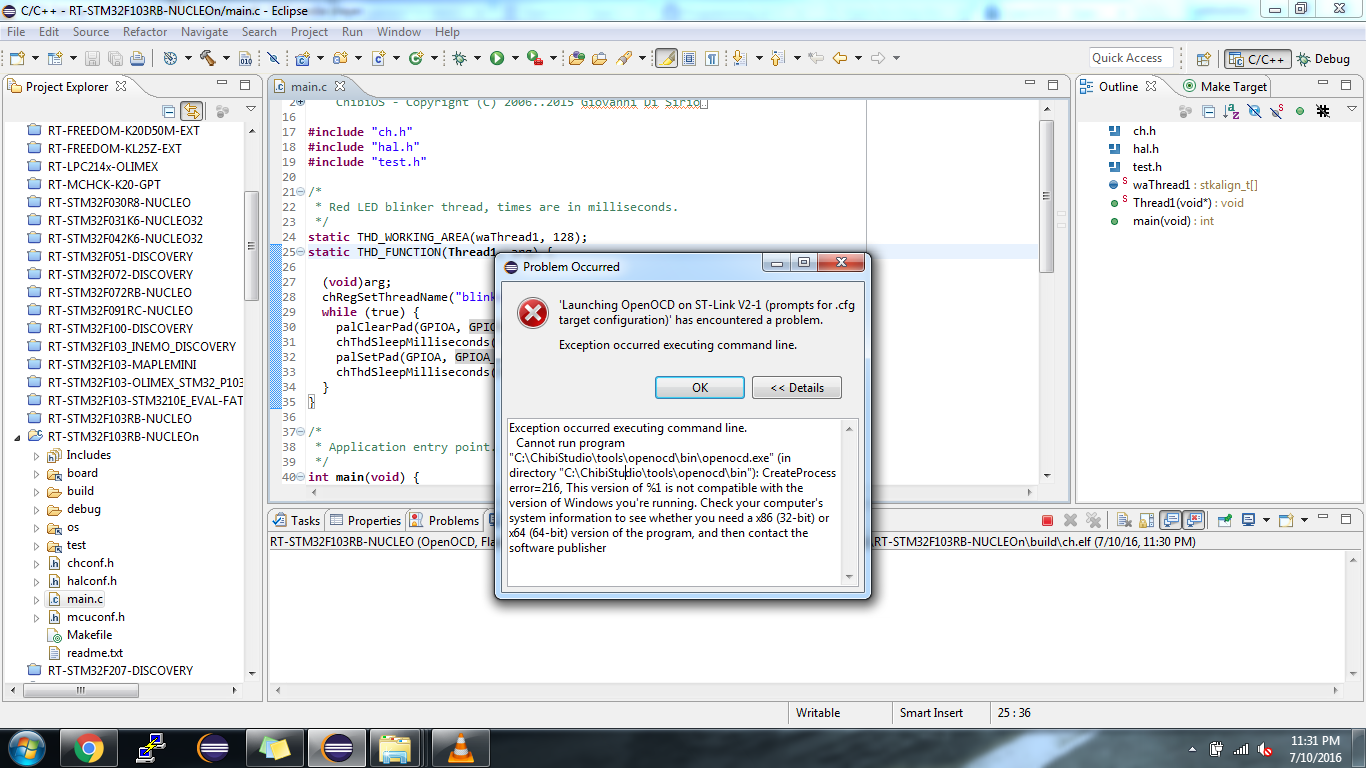
chibi-studio throwing error while opening open-ocd
Posted: Mon Jul 11, 2016 4:50 am
by ep.hobbyiest
Hi,
I m using chibios rt and stm32f103 nucleo board.
From chibistudio i just build existing program, it is build successfully. But when i tried to load open-ocd, i got errors. I m not able to load the openocd properly. Open-ocd is 64 bit is there it seems.
i have attached screen shot for reference.

Re: chibi-studio throwing error while opening open-ocd
Posted: Mon Jul 11, 2016 7:15 am
by ep.hobbyiest
Here are the things i tried.
I downloaded both openocd 0.8 as well as openocd 0.9.
openocd 8.0 didn't work, i guess. Bcoz console window was completely blank, we i ran that.
with Openocd 0.9, i got following logs,
Code: Select all
Open On-Chip Debugger 0.9.0 (2015-05-19-12:06)
Licensed under GNU GPL v2
For bug reports, read
   http://openocd.org/doc/doxygen/bugs.html
Warn : Interface already configured, ignoring
Error: already specified hl_layout stlink
Info : The selected transport took over low-level target control. The results might differ compared to plain JTAG/SWD
adapter speed: 1000 kHz
adapter_nsrst_delay: 100
none separate
srst_only separate srst_nogate srst_open_drain connect_deassert_srst
Info : Unable to match requested speed 1000 kHz, using 950 kHz
Info : Unable to match requested speed 1000 kHz, using 950 kHz
Info : clock speed 950 kHz
Error: open failed
in procedure 'init'
in procedure 'ocd_bouncer'
It is showing error at two places.
and when i tried to flash then got same error as "Execution is suspended because od error !!!"
I m using chibistudio 17.7 and RT-STM32F103RB-NUCLEO demo.
Re: chibi-studio throwing error while opening open-ocd
Posted: Mon Jul 11, 2016 8:03 am
by Giovanni
Are ST-Link drivers installed?
Giovanni
Re: chibi-studio throwing error while opening open-ocd
Posted: Mon Jul 11, 2016 2:10 pm
by ep.hobbyiest
Yes, I was using Nucleo board with Keil compiler before.
Re: chibi-studio throwing error while opening open-ocd
Posted: Mon Jul 11, 2016 2:41 pm
by Giovanni
The first error is "normal", it is more a warning, the relevant part is that "open failed".
In next release I will make sure to include a 32bits version of OpenOCD but that is not your only problem.
Do you see ST-Link in the device manager? you should see it also as a virtual com port and a disk drive.
Giovanni
Re: chibi-studio throwing error while opening open-ocd
Posted: Mon Jul 11, 2016 6:00 pm
by ep.hobbyiest
Thanks for quick reply.
Yes, Board is getting detected.
COM_port is being detected as well as disk drive is also detecting.
is it work for 64-bit windows?
Re: chibi-studio throwing error while opening open-ocd
Posted: Mon Jul 11, 2016 6:10 pm
by RoccoMarco
Hi,
what version of windows are you using? Any antiviruses? version of chibistudio?
RM
PS: I have tested latest version of OpenOCD (that included in ChibiStudio) under Windows 7 32-64, Windows 8 32-64, Windows 8.1 64 and Windows 10 64
Re: chibi-studio throwing error while opening open-ocd
Posted: Mon Jul 11, 2016 6:23 pm
by ep.hobbyiest
Following are the configuration i m using.
OS :Windows 7 ultimate 32-bit.
Chibistudio : ChibiStudio_Preview17
Demo : RT-STM32F103RB-NUCLEO
Antivirus : No
Re: chibi-studio throwing error while opening open-ocd
Posted: Mon Jul 11, 2016 6:52 pm
by RoccoMarco
Let me do some tests. Maybe OpenOCD is incompatible with windows32. I will keep you up to date.
Re: chibi-studio throwing error while opening open-ocd
Posted: Tue Jul 12, 2016 7:47 pm
by ep.hobbyiest
Ok. Thanks.
u can tell me if anything i can try from my end.